Advertisement
Artificial intelligence is quietly reshaping how software gets built. What once took hours of manual effort can now be done in minutes with tools that predict, generate, and refine code. Developers are no longer working alone—they’re collaborating with intelligent systems that learn from millions of code examples and project histories.
This shift is creating a new kind of workflow where creativity meets automation. From smarter debugging to self-writing documentation, AI is not just helping developers move faster—it’s helping them think differently about how software should be designed, tested, and improved. The change isn’t coming; it’s already happening.
Writing code has traditionally been the most labor-intensive part of development. With AI tools like GitHub Copilot and Amazon CodeWhisperer, developers now have systems that can suggest whole lines or blocks of code based on the context of what they’re working on. These tools use natural language models trained on millions of public code repositories and documentation.
The real benefit lies in how these tools reduce repetitive coding tasks. A developer can write a comment like “sort list of users by last login date,” and the AI can instantly generate a working function. While these suggestions often require review and minor adjustment, they offer a huge time saver and allow developers to focus more on the logic and architecture of their applications. This also helps less experienced developers write cleaner, more consistent code by leaning on industry-standard patterns learned by the AI.
Testing is often under pressure during fast-paced development cycles, but it's also critical for shipping reliable software. AI is now playing a major role in generating and managing tests. It can create test cases based on code behavior, monitor test coverage, and even flag logic gaps in the test suite.
Machine learning models can scan through large codebases and spot patterns that may result in errors. Tools like DeepCode or Codiga analyze code in real-time to identify security vulnerabilities or inefficient logic—long before it reaches production. They go beyond basic syntax checks and static analysis by understanding code structure and usage patterns.
Some advanced systems even predict future bugs by identifying modules that historically have had higher failure rates. This prediction allows teams to focus their testing efforts more precisely, catching potential issues before they affect users.
Peer reviews are a standard part of modern development practices, but they can be inconsistent depending on who’s reviewing and how much time they have. AI-powered tools are making this process more reliable. Instead of relying solely on human reviewers, teams can use tools that scan pull requests for potential problems, enforce style guidelines, and even assess complexity.
These systems offer contextual suggestions based on past reviews, existing project standards, and code history. For example, an AI might flag a newly introduced loop as inefficient or suggest breaking a function down into smaller units for clarity—just as a skilled reviewer would. The difference is speed and scale. AI can review thousands of lines of code within seconds and highlight issues that might slip past a human eye during a busy sprint.
By automating some of the more mechanical aspects of code review, human reviewers can focus their attention on higher-level concerns like overall architecture or feature alignment.
DevOps practices thrive on automation and efficiency. AI is taking this further by making decisions within the deployment pipeline itself. For example, some platforms use AI to monitor system performance metrics in real-time and determine whether a build should proceed to production or be held back for further testing.
Predictive analytics also comes into play. AI can analyze logs and performance trends to identify possible system failures before they happen. In cloud environments, AI can manage resources dynamically—scaling infrastructure based on usage forecasts or adjusting deployment strategies depending on expected traffic.
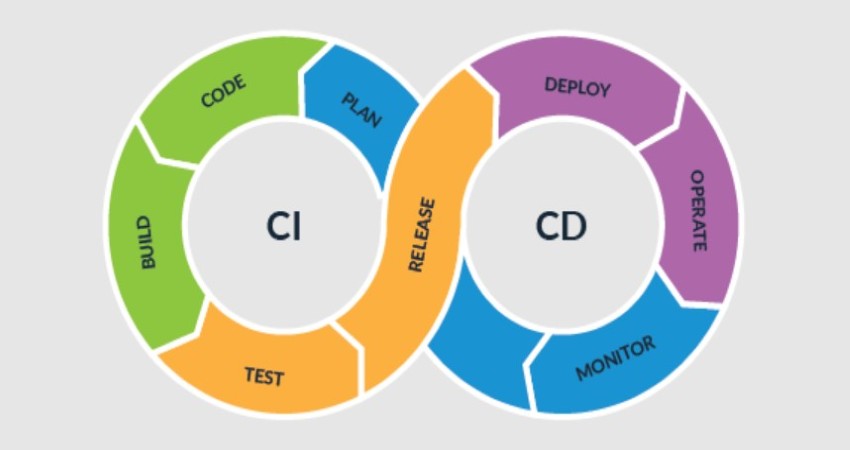
Continuous Integration/Continuous Deployment (CI/CD) tools can be enhanced with AI to prioritize builds, detect flaky tests, and optimize the sequence in which tasks are executed. This cuts down build times and ensures critical updates reach users more quickly and safely.
One area where AI really stands out is in translating natural language into something developers and systems can understand. For documentation, this means AI can generate or update technical docs based on code changes. Instead of requiring developers to manually document every new function or API endpoint, AI tools like Mintlify or DocGPT can create clear, formatted documentation by analyzing the code and comments.
On the other side, AI can also help developers understand complex code written by someone else. You can ask questions like, “What does this function do?” and the AI will return a simplified explanation. This is especially helpful in onboarding scenarios or when working with legacy codebases.
AI-powered chat interfaces are even becoming part of integrated development environments (IDEs), where developers can query documentation or search for solutions within their code editor without breaking their flow. These tools are not just about convenience—they reduce friction in day-to-day work and help make knowledge more accessible across teams.
AI in software development isn’t a prediction—it’s already here, woven into tools that developers use every day. From generating code and tests to assisting with reviews and documentation, AI is reshaping what it means to write software. Developers are now freed from some of the more mechanical aspects of coding and can invest more time in shaping ideas and solving meaningful problems. The changes are subtle but powerful. It's not about replacing the developer—it’s about making the process smoother, faster, and more consistent. As artificial intelligence continues to evolve, it’s clear that its place in the development world will only grow. Developers who embrace it won’t just save time—they’ll be building smarter from the ground up.
Advertisement
Explore the real-world differences between Claude AI and ChatGPT. This comparison breaks down how these tools work, what sets them apart, and which one is right for your tasks
How to write a custom loss function in TensorFlow with this clear, step-by-step guide. Perfect for beginners who want to create tailored loss functions for their models

Looking for the best Langchain alternatives in 2025? Explore 8 top LLM frameworks that offer simpler APIs, agent support, and faster development for AI-driven apps
New to neural networks? Learn the top 3 things you must understand before you begin. This guide explains how neural networks work, why data matters, and what to expect from these learning systems

Meta introduces Llama 4, intensifying the competition in the open-source AI model space with powerful upgrades.

AI Trading is transforming the stock market by analyzing data, predicting trends, and executing smarter trades. Learn how artificial intelligence improves accuracy, manages risk, and reshapes modern investment strategies for both institutions and individual investors
Understand what machine learning (ML) is, its major types, why it is so important, how it works, and more in detail here
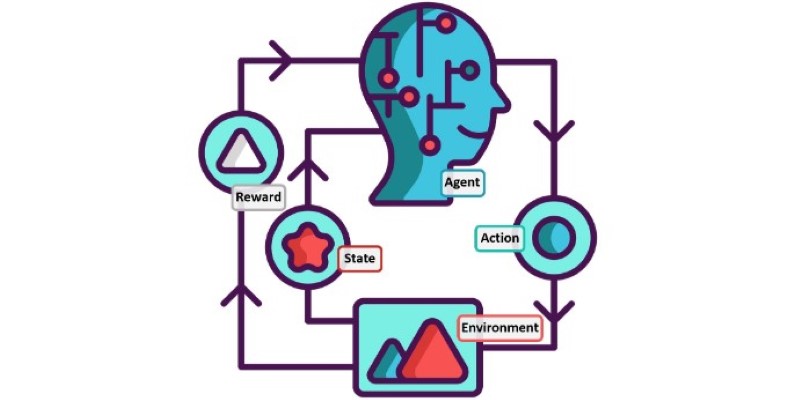
Confused between lazy learning and eager learning? Explore the differences between these two approaches and discover when to use each for optimal performance in machine learning tasks
How to build your personal AI agent network from the ground up. Discover practical ways to connect, train, and coordinate multiple AI agents to simplify daily work, manage information, and create a more efficient digital support system

A Nvidia AI-powered humanoid robot is now serving coffee to visitors in Las Vegas, blending advanced robotics with natural human interaction in a café setting
Tech giants respond to state-level AI policies, advocating for unified federal rules to guide responsible AI use.
Can ChatGPT be used as a proofreader for your daily writing tasks? This guide explores its strengths, accuracy, and how it compares to traditional AI grammar checker tools